How to Choose Between Microsoft’s New Surface Laptop Ultra and Apple’s MacBook Neo
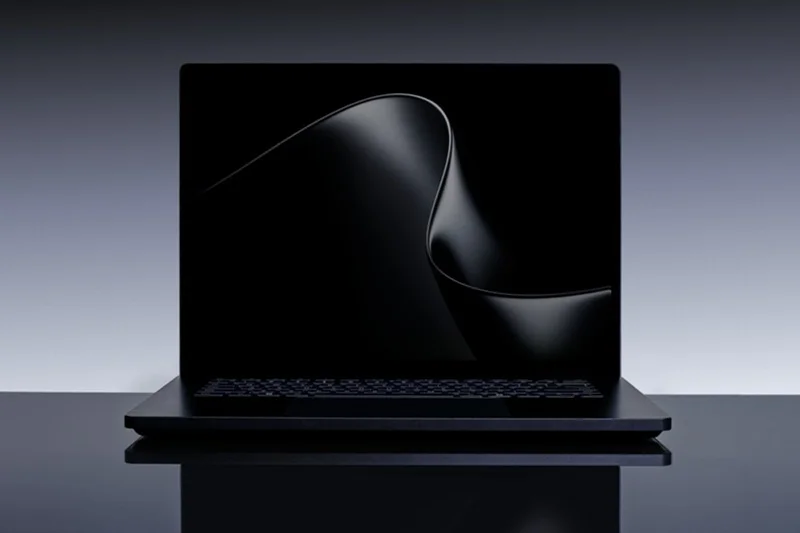
For years, Apple and Microsoft have competed over what the “perfect laptop” should be. In 2026, that debate seems more intense than ever. On one side is Microsoft’s newly announced Surface Laptop Ultra. This machine focuses on performance, AI tasks, gaming power, and a large premium display. On the other side is Apple’s surprisingly affordable MacBook Neo, a lightweight laptop priced at $599, designed for students, casual users, and anyone who wants a reliable Mac without spending too much. At first glance, comparing the two feels a bit unfair. They target different customers, budgets, and lifestyles. However, that’s why the comparison is important. If you’re deciding between the Surface Laptop Ultra and MacBook Neo, the real question isn’t which one is “better.” It’s which one fits how you work, travel, create, and spend your money.
Surface Laptop Ultra vs MacBook Neo: Specs Overview
| Feature | MacBook Neo | Surface Laptop Ultra |
| Processor | Apple A18 Pro | Nvidia RTX Spark |
| RAM | 8GB | Up to 128GB unified memory |
| Graphics | Integrated GPU | 6,144 CUDA cores |
| Display | 13-inch LCD | 15-inch mini-LED touchscreen |
| Battery Life | Up to 16 hours | All-day battery claim |
| Weight | 1.23 kg | Heavier desktop-style design |
| Operating System | macOS | Windows |
| Starting Price | $599 | Expected premium pricing |
Performance: One Is Built for Everyday Life, the Other Is Built for Everything
This is where the gap becomes impossible to ignore. The MacBook Neo is clearly designed for everyday users. It handles emails, web browsing, office work, streaming, video calls, and even some light photo editing with ease. Apple’s A18 Pro chip is efficient, smooth, and works well with macOS. For many people, that’s more than enough. The Surface Laptop Ultra, on the other hand, falls into a completely different category. Microsoft positions this laptop as a true performance machine, one that can handle AI workloads, 4K and 8K video editing, advanced rendering, and high-end gaming. Nvidia’s RTX Spark architecture, along with 6,144 GPU cores and up to 128GB of unified memory, brings it closer to a mobile workstation than a regular laptop. In simple terms, the MacBook Neo is practical. The Surface Laptop Ultra is powerful in a good way.
Display and Design: Portability vs Premium Experience
Apple kept things simple with the MacBook Neo. The laptop has a compact 13-inch display and a lightweight design that is perfect for commuting, classrooms, cafés, and flights. Its battery efficiency is a major selling point. Apple offers colorful finishes, including Blush, Citrus, Indigo, and Silver, giving it a youthful look compared to earlier MacBooks. Microsoft took a different approach. The Surface Laptop Ultra is larger, thicker, and clearly premium. Its 15-inch mini-LED touchscreen can reach up to 2,000 nits of HDR brightness. This makes it one of the most visually impressive displays that Microsoft has ever included in a Surface device. Unlike many ultra-thin laptops, Microsoft did not compromise on connectivity. Users get HDMI, multiple USB-C ports, USB-A, and a headphone jack, which is still important to many professionals. The difference comes down to lifestyle. If you take your laptop everywhere, the MacBook Neo is more practical. If your laptop also serves as a creative workstation, the Surface Laptop Ultra offers a much richer setup.
Surface Laptop Ultra vs MacBook Neo: Operating System Experience
The debate about operating systems still matters more than most people realize. The MacBook Neo benefits from Apple’s tightly controlled ecosystem. If you already own an iPhone or iPad, the experience feels seamless. Features like AirDrop, iMessage syncing, FaceTime continuity, and shared apps make switching easy. For students and casual users, macOS is one of the simplest desktop operating systems to use. On the other hand, the Surface Laptop Ultra focuses on flexibility. Windows offers wider software compatibility, supports touchscreens, allows for gaming freedom, has stylus features, and integrates better with businesses. Professionals who work with specialized software or gaming platforms will probably feel more at home in Microsoft’s ecosystem. Neither option is clearly better. It really depends on how you use your devices each day.
Price Changes Everything
This might be the most important factor in the Surface Laptop Ultra and MacBook Neo discussion. The MacBook Neo starts at only $599. This makes it Apple’s least expensive modern MacBook in years. That price shifts the entire laptop market. Now, students and budget-minded buyers can join the Apple ecosystem without spending over $1,000. On the other hand, Microsoft’s Surface Laptop Ultra is in a different ballpark. The official price hasn’t been announced yet, but analysts predict it will compete directly with top workstation-class systems, including Apple’s high-end MacBook Pro models. This probably means it will cost several thousand dollars. So, while these devices may grab attention, they don’t really target the same customers.
Who Should Buy the MacBook Neo?
The MacBook Neo feels tailor-made for people who want a simple, reliable laptop without spending a fortune. Students will appreciate the lightweight design and long battery life, while remote workers and casual users get a machine that comfortably handles everyday tasks like browsing, streaming, video calls, and document work. It also makes a lot of sense for anyone already using an iPhone or iPad, thanks to Apple’s tightly connected ecosystem. Features like AirDrop, iCloud syncing, and seamless app continuity add convenience that many users quickly get used to. And for buyers who care more about portability and battery life than raw performance, the MacBook Neo checks the right boxes. At $599, Apple is offering an entry point into the Mac ecosystem that feels surprisingly accessible compared to previous generations.
More Stories Worth Exploring
What’s New on HBO Max?
Explore the biggest movie additions streaming on HBO Max this June, from cult classics to recent hits.
Where Watch Spelling Bee Live?
Discover how and where to catch the 2026 Scripps National Spelling Bee live tonight.
How Big Is Backrooms’ Debut?
Discover how Backrooms shattered expectations and became A24’s biggest opening weekend success.
Can Fans Outsmart Ticket Bots?
Check out practical strategies that can improve your chances of securing concert tickets faster.
Why Looks Tonight’s Moon Different?
Explore the science behind tonight’s bright moon and tomorrow’s rare Blue Moon phenomenon.
Who Should Buy the Surface Laptop Ultra?
The Surface Laptop Ultra is clearly aimed at power users who need serious performance from their machines. Microsoft is targeting video editors, AI developers, creative professionals, gamers, engineers, and designers who regularly work with demanding applications and heavy workloads. It also makes sense for people looking to replace traditional desktop workstations with something more portable without sacrificing performance. This isn’t a casual browsing laptop built for simple everyday tasks. The Surface Laptop Ultra is designed for users who push hardware to its limits, whether that means editing high-resolution video, running AI models, rendering complex designs, or handling advanced multitasking throughout the day.
FAQs
Is the MacBook Neo good for students?
Yes. The MacBook Neo’s $599 price, lightweight design, and long battery life make it one of the strongest student laptop options in 2026.
Can the Surface Laptop Ultra handle gaming?
Absolutely. With Nvidia RTX Spark graphics and 6,144 CUDA cores, the Surface Laptop Ultra is built for demanding gaming and creative workloads.
Which laptop has better battery life?
The MacBook Neo currently advertises up to 16 hours of battery life. The Surface Laptop Ultra also promises all-day use but prioritizes performance over maximum endurance.
Is the Surface Laptop Ultra more powerful than the MacBook Neo?
Yes, by a huge margin. The Surface Laptop Ultra targets professional-level performance, while the MacBook Neo focuses on mainstream everyday computing.
Which laptop is better for creators?
For professional creators working with video editing, AI tools, or rendering software, the Surface Laptop Ultra is the stronger option.